Frequently Asked Questions
Everything you need to know about ejecting water from phone speakers, safe drying methods, dust cleaning, device compatibility, and the acoustic science behind our free tool.
💧 Water Removal Questions
How to safely and effectively remove water from your phone or device speakers.
The tool plays a calibrated 165Hz low-frequency tone that drives the speaker diaphragm to its maximum linear excursion — a rapid back-and-forth displacement producing intense micro-pulses of positive air pressure. These pulses shatter the liquid surface tension (72.8 mN/m) holding water droplets to the hydrophobic acoustic mesh grille, forcing them outward through the speaker port.
The identical acoustic principle powers Apple Watch Water Lock. Fix My Speaker makes this technology freely available in any web browser using the Web Audio API.
- Mild exposure (rain, sweat, splash): 1–2 cycles of 60 seconds
- Moderate submersion (brief dip, sink): 3 water eject cycles, 30-second rest between each
- Full submersion (pool, toilet, heavy rain): 4 water eject cycles + 1 dust removal sweep to clear mineral residue
Always hold the speaker face-down onto an absorbent towel throughout the process.
Initial acoustic pulses break larger water pools into fine micro-droplets dispersed across the internal acoustic damping mesh. These require additional cycles to fully dislodge. Run the Water Eject cycle 2–3 times consecutively — you'll notice progressive improvement in sound clarity between each cycle. Finish with a Dust Removal sweep to clear residual mineral film left after water evaporates.
Hold your phone at a 45°–90° angle with the speaker grilles pointing directly downward onto a soft, dry paper towel or microfiber cloth. Gravity pulls expelled water droplets away from the phone so they do not get re-absorbed into the acoustic mesh during the diaphragm recoil phase between pulses.
These liquids leave corrosive residue after drying. If IP67/IP68 rated: immediately rinse the speaker port under a gentle stream of fresh tap water for 3–5 seconds to dilute solutes, wipe dry, then run Water Eject 3–4 times with the speaker facing down. Air dry for 4–6 hours with silica gel nearby, then run a Dust Removal sweep to dislodge crystallized mineral residue.
A community "Water Eject" Shortcut exists in the Apple Shortcuts app. However, it routes audio through Siri's limited pipeline, capping both volume and frequency precision. Fix My Speaker's Web Audio API approach drives the speaker at full hardware output capability — the same API used in professional audio apps — resulting in significantly stronger acoustic pressure and more thorough water ejection. Read our full iPhone Water Eject comparison guide.
Never force-charge while liquid may be present. Unplug all cables, tap the phone against your palm with the port facing down, run Fix My Speaker to displace moisture from adjacent acoustic cavities, and allow the connector to air-dry in a well-ventilated area for 2–4 hours minimum before reconnecting a charger. Use Emergency Override (on iPhone) only if absolutely necessary.
Complete silence suggests the audio amplifier entered emergency shutdown, or water shorted the headphone detection pins (causing the phone to think headphones are plugged in — check port for debris). Power the phone off, dry it with silica gel for 12–24 hours, then check the Liquid Contact Indicator inside the SIM tray slot. If still silent after drying, seek professional repair.
🌪️ Dust & Lint Cleaning Questions
How to remove pocket lint, fine dust, and debris from speaker grilles safely.
Water Eject Mode (165Hz): A sustained pulsed sine wave calibrated for maximum pneumatic piston displacement to physically propel liquid droplets out of the speaker chamber.
Dust Removal Mode (200Hz–1500Hz): Dynamically sweeps across a wide frequency range to agitate dry particles — pocket lint, sand grains, fine dust — at multiple harmonic resonance points. Different particle sizes respond to different frequencies, so the sweep ensures comprehensive removal across the acoustic cavity.
Safest methods, in order of recommendation:
- Fix My Speaker Dust Removal Mode — acoustic vibration dislodges particles without physical contact
- Soft painter's tape — gently press and lift to pick up surface lint
- Compressed air at 6-inch distance — short bursts at low pressure
- Soft dry brush — clean toothbrush or dedicated electronics brush swept lightly across the grille
Never use: toothpicks, needles, pins, or cotton swabs — these push lint deeper and damage the mesh.
- Pocket lint compaction — most common cause, built up over months of pocketing
- Fine dust film on acoustic mesh reducing high-frequency transmission
- Phone case blocking speaker ports
- Software issue — equalizer misconfigured, mono audio enabled, or volume limiter active
- Physical speaker damage — torn diaphragm from a drop (crackling + muffled together)
Run the Deep Dust Clean tool first. If still muffled, check Settings → Accessibility → Audio/Visual for software causes. See our Android speaker cleaning guide or iPhone speaker cleaning guide for device-specific steps.
For most users: a 30-second dust removal cycle once per month prevents significant lint buildup. For dusty, sandy, or high-particulate environments (construction, outdoors, gym): run the tool weekly or whenever audio clarity noticeably decreases.
📱 Device Compatibility Questions
Which phones, earbuds, tablets, and laptops are supported.
Yes. All iPhone models — iPhone 6s through iPhone 16 Pro Max — in Safari, Chrome, or any iOS browser. Turn media volume to 100% and press Start. Ensure Low Power Mode is OFF as it limits speaker output. See our full iPhone speaker cleaning guide.
Yes. All Android smartphones — Samsung Galaxy (S-series, A-series, Z-Flip, Z-Fold), Google Pixel (all generations), OnePlus, Xiaomi, Motorola, Oppo, Realme, Nothing Phone — running Android 5.0 or later. Disable Do Not Disturb and turn volume up via physical buttons. See our Android speaker cleaning guide.
Yes. Connect your AirPods, AirPods Pro, Samsung Galaxy Buds, Sony WF earbuds, or any Bluetooth earbuds, then open Fix My Speaker. Remove them from your ears, angle the speaker mesh downward onto a tissue, and run the cycle. Highly effective for post-workout sweat and shower condensation. See our AirPods cleaning guide.
Yes. Open Fix My Speaker in Chrome, Safari, Firefox, or Edge on your MacBook, Windows laptop, or desktop. Set system volume to 100%. Angle the laptop so speaker vents face slightly downward. Particularly useful after spilling liquid on a keyboard, which can drip onto the internal speaker assembly.
Yes. All iPads and Android tablets are fully supported. iPads typically have four-speaker stereo systems — use the "Both Speakers" channel mode and hold landscape-mode with the bottom edge angled downward for best drainage.
🛡️ Safety & Damage Questions
Is this method safe? Will it damage my device? What are the limits?
No. The frequencies used (80Hz–1500Hz) are within the manufacturer-specified acoustic bandwidth of every modern smartphone micro-transducer. The tool is calibrated to keep voice coil thermal dissipation well below the IEC 60268-5 safety standard threshold of 85°C. Acoustically equivalent to playing music at high volume — a completely normal speaker operating condition.
No. Apple, Samsung, and Google officially advise against rice. Fine starch particles and grain dust enter charging ports and speaker meshes, mixing with moisture to form a corrosive paste that accelerates motherboard oxidation. Uncooked rice absorbs moisture 5–10x less effectively than silica gel desiccant packets — the correct alternative.
Never use a hair dryer or heat gun. Intense heat softens waterproof rubber adhesive gaskets, warps the ultra-thin plastic speaker diaphragm, and risks lithium-ion battery thermal runaway. Gentle room-temperature airflow from a desk fan is the only safe thermal method — but acoustic cleaning with Fix My Speaker is faster and more effective.
Acoustic cleaning only clears physical obstructions — liquid, dust, lint. If the speaker membrane is physically torn, the voice coil is deformed from a drop, or the audio amplifier IC is damaged by water corrosion, acoustic cleaning cannot repair that hardware. Persistent crackling after thorough cleaning indicates physical damage requiring professional repair.
No. Sound waves only pump air inside acoustic cavities connected to external speaker grilles. The speaker diaphragm has no physical pathway to the display assembly or camera module. Moisture under the display or inside camera lenses indicates compromised waterproofing seal failure — power the device off, use silica gel, and consult an authorized repair center.
⚙️ How the Tool Works
The acoustic science behind Fix My Speaker explained.
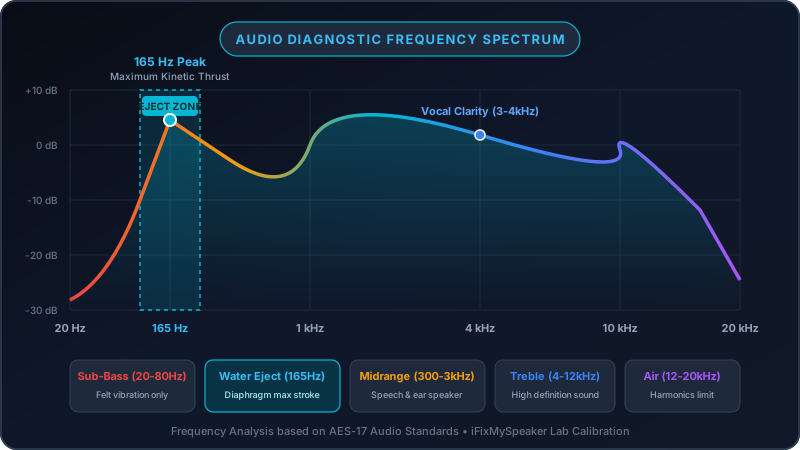
165Hz corresponds to the mechanical resonance frequency of most modern smartphone micro-speaker cavities — where the cone naturally achieves its maximum physical stroke length with least electrical energy input, producing the strongest possible acoustic radiation pressure to break capillary water tension without generating excess heat in the voice coil. Apple identified this same frequency for Apple Watch Water Lock, validating it as the optimal smartphone speaker clearing tone.
An internet connection is required to initially load the page. Once loaded, all sound frequencies are generated entirely in your browser using the Web Audio API — no internet is needed while actively running. If you anticipate needing offline access, load the page before losing connectivity.
No. Fix My Speaker is a sound output tool only. It never requests microphone access, never listens to your device, and never uses any audio input APIs. It exclusively uses the Web Audio API's oscillator and output nodes to generate and play calibrated tones through your device speakers.
Apple Watch Water Lock is a native OS feature playing a proprietary 165Hz acoustic pulse to expel water from its sealed speaker enclosure. Fix My Speaker uses the identical acoustic frequency and pneumatic displacement principle via the browser Web Audio API, making the same technology universally available on any device — iPhone, Android, MacBook — at zero cost.
Use Fix My Speaker's built-in Audio Diagnostic section on the homepage. Play the 440Hz Voice Clarity Check to test mid-range speech frequencies, the 2500Hz Treble Chime to verify high-frequency response without distortion, and the Stereo Pan test to confirm both channels operate independently. Or visit our dedicated Speaker Sound Test page.