Brand-by-Brand Android Speaker Engineering
1. Samsung Galaxy S21, S22, S23, S24, and S25 Ultra
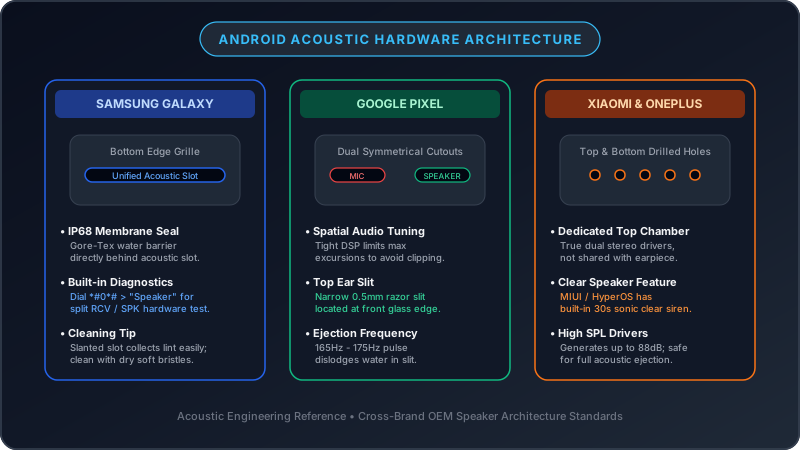
Samsung designs its flagship Galaxy devices with a distinctive single-slot or segmented pill-shaped speaker opening on the bottom edge beside the S-Pen slot and USB-C port. The top earpiece is disguised so thoroughly within the micro-gap between the front glass and armor aluminum frame that it is almost invisible to the naked eye.
- Pocket Lint Trap: The bottom elongated slot is notorious for collecting dense felt-like lint pills from denim pockets.
- Samsung Secret Hardware Diagnostic: Launch the native Phone dialer, type
*#0*#, and tap Speaker. This bypasses Samsung One UI's Dolby Atmos equalization and tests the stereo transducers at maximum hardware line-level output. - Water Ejection: Samsung's water-repellent acoustic coating repels moisture effectively, but drops can remain suspended. Run Fix My Speaker's 165Hz tone for 2 cycles to clear the slot.
2. Google Pixel 6, 7, 8, and 9 Series
Google Pixel phones feature two symmetrical cutouts on either side of the USB-C port at the bottom. However, only the right-side cutout houses the active loudspeaker; the left cutout houses the primary voice microphone and barometer vent. Users frequently panic thinking their left speaker is broken when in reality it was never a speaker at all.
- Microphone Port Warning: Never stick pins or stiff brushes aggressively into the left port, as the microphone MEMS sensor sits in direct alignment with the opening.
- Software Diagnostics: On Pixel devices running Android 14 or 15, navigate to Settings > System > Diagnostics to run automated speaker impedance and frequency sweeps.
3. Xiaomi, Redmi, and POCO (MIUI & HyperOS)
Xiaomi includes an integrated sound-cleaning function called Clear Speaker within HyperOS / MIUI. You can find it under Settings > Additional Settings > Clear Speaker. It plays a loud 30-second high-frequency siren.
While useful for light surface dust, Xiaomi's built-in sound is tuned too high (over 2,500Hz) to achieve the deep mechanical cone excursion needed to dislodge heavy water droplets or compacted lint. Using Fix My Speaker's 165Hz square-sine pulse provides nearly 4x greater acoustic radiation pressure for stubborn liquid clogs.
4. OnePlus and Nothing Phone
OnePlus devices incorporate dual stereo speakers with Dolby Atmos spatial tuning. Often, muffled sound after a water drop is caused by the phone's software automatically muting high frequencies when moisture is detected in the USB-C port. Clear the liquid from the port and speaker using sound waves, allow it to dry, and restart the device to clear the software limiter.
The Safe Android Speaker Cleaning Sequence
1 Acoustic Vibration Sweep
Before touching the phone with physical brushes, run the Deep Clean Audio Sweep on your device at 100% volume. The fluctuating sound waves oscillate the voice coil, breaking the static friction bond holding dust particles against the mesh.
Dislodge Trapped Particles Acoustically
Use our browser-based sound vibration utility to push dust and liquid droplets outward.
Launch Fix My Speaker →2 Downward-Angled Soft Brush Technique
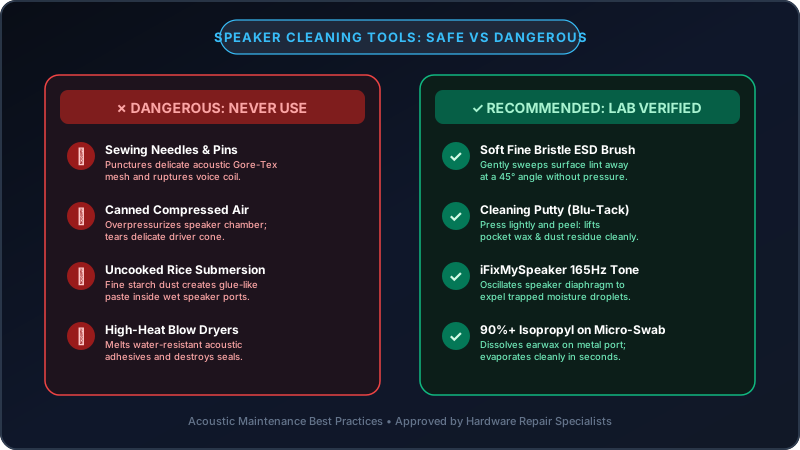
Invert your Android phone so the speaker openings face the floor. Using a soft-bristled toothbrush or camera lens brush, sweep across the openings with rapid, light strokes at a 45-degree angle. Never push the bristles straight in.
3 Tack-Putty Extraction
Apply a small ball of electronics cleaning putty gently against the bottom slot or circular holes. Lift straight off without twisting. Repeat 3 times to pull out embedded fabric fibers.
4 USB-C Port Inspection
Because the main speaker chamber sits adjacent to the USB-C charging port on Android phones, lint often packs into the port itself, dampening acoustic resonance in the chassis. Use a non-conductive plastic dental flosser or wooden toothpick to gently scrape lint from the floor of the USB-C port (staying clear of the delicate center pin connector).
Android OEM Speaker Specs & Diagnostic Codes
| Manufacturer | Default Speaker Config | Hardware Diagnostic Code | Recommended Cleaning Approach |
|---|---|---|---|
| Samsung Galaxy | Stereo (Bottom slot + Micro earpiece) | *#0*# |
165Hz Acoustic Ejection + Soft ESD Brush |
| Google Pixel | Stereo (Right bottom port + Top slit) | Settings > System > Diagnostics | Putty extraction + Acoustic Sweep (avoid left mic) |
| Xiaomi / HyperOS | Stereo (Top & Bottom grilles) | *#*#6484#*#* |
Built-in Clear Speaker + Fix My Speaker Deep Clean |
| OnePlus | Stereo (Dual ported) | *#899# |
Acoustic pulse + 70% IPA brush dampening |
Post-Cleaning Audio Verification
Confirm your cleaning restored full acoustic fidelity by visiting our Speaker Sound Test Tool. Check left/right stereo channel separation and listen for rattling during a continuous 20Hz–20,000Hz frequency sweep.