Understanding iPhone Speaker Architecture
Every modern iPhone—from the iPhone 11 series up through the iPhone 15 and 16 Pro families—features a complex acoustic enclosure designed to preserve IP68 water resistance while delivering loud stereo sound. Understanding the two distinct speaker areas is essential:
- The Earpiece Speaker / Top Acoustic Aperture: Located either in the upper display bezel or along the edge of the Dynamic Island cutout. It utilizes a micro-slit lined with an extremely delicate, laser-perforated hydrophobic membrane. Because this aperture rests against your ear and cheek during phone calls, it is vulnerable to human sebum (facial oils), cosmetics, sweat, and earwax.
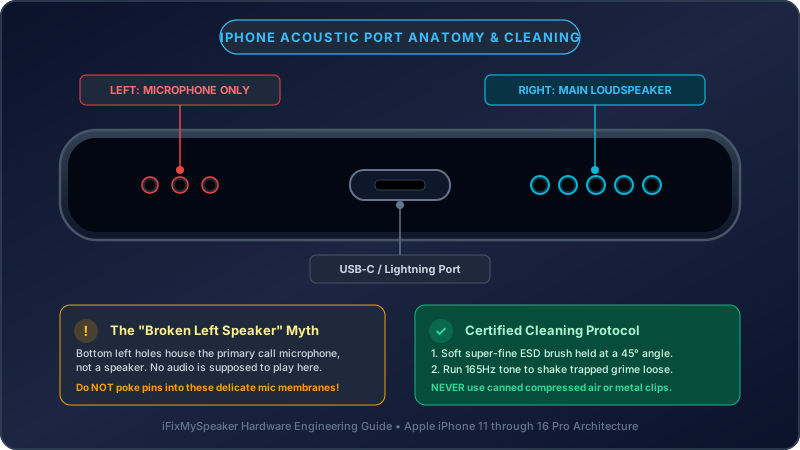
- The Bottom Loudspeaker Grilles: Flanking the Lightning or USB-C charging connector at the base of the chassis. On most models, the left holes house a primary microphone while the right holes house the main loudspeaker transducer. These circular holes frequently fill with compacted cotton pocket lint.
The Safe 4-Step iPhone Speaker Cleaning Protocol
1 Acoustic Vibration Pre-Clean (Fix My Speaker)
Before applying any physical tool to the grilles, use acoustic energy to loosen compacted lint and shake free internal particulate films. Open our free Deep Clean Audio Utility on your iPhone Safari browser. Turn device volume to maximum and tap play. The fluctuating 80Hz–1,200Hz sweep creates physical diaphragm oscillations that push debris outward toward the surface of the grille holes.
If your speaker suffered recent water exposure or rain, run the 165Hz Water Eject Sound first to dispel moisture.
Loosen Debris With Sound Waves
Run our acoustic frequency sweep to dislodge compacted particles before brushing.
Start Deep Clean Sweep →2 Gentle Brushing with a Super-Soft ESD Bristle Brush
Use a clean, dry toothbrush with ultra-soft bristles (such as an extra-soft infant toothbrush) or an anti-static electronics detailing brush:
- Hold your iPhone so the speaker grilles point downward toward the floor, ensuring gravity prevents loosened debris from falling deeper inside.
- Tilt the brush at a 45° angle relative to the frame.
- Make gentle, circular sweeping motions across the speaker ports. Do not exert heavy pressure inward; allow the tip of the bristles to sweep the lint out.
3 Cleaning Putty / Blu-Tack Extraction
For fine lint and dust compacted deep inside the circular holes of the bottom speaker:
- Take a pea-sized sphere of electronics cleaning putty or fresh Blu-Tack.
- Knead the material between your fingers until it is warm and pliable.
- Gently press the putty against the exterior of the speaker grille holes just enough to contact the surface lint.
- Pull the putty straight backward in a swift motion. The adhesive grip of the putty will extract the lint without leaving residue.
- Warning: Do not push the putty forcefully into the holes with a sharp tool, as small pieces could break off inside.
4 Disinfecting & Dissolving Sebum with 70% Isopropyl Alcohol
If the top earpiece speaker is muffled from facial oils and earwax, dry brushing alone may not break down the greasy layer:
- Moisten the very tips of your soft brush bristles with a tiny droplet of 70% Isopropyl Alcohol (IPA). Dab the brush against a paper towel so it is damp, not dripping.
- Very lightly brush the top ear speaker slit with the phone tilted downward.
- 70% alcohol dissolves wax and evaporates in seconds without leaving mineral film or harming Apple oleophobic glass coatings.
- Never spray alcohol or liquid directly onto the iPhone screen or into ports.
Safe vs Destructive Cleaning Tools
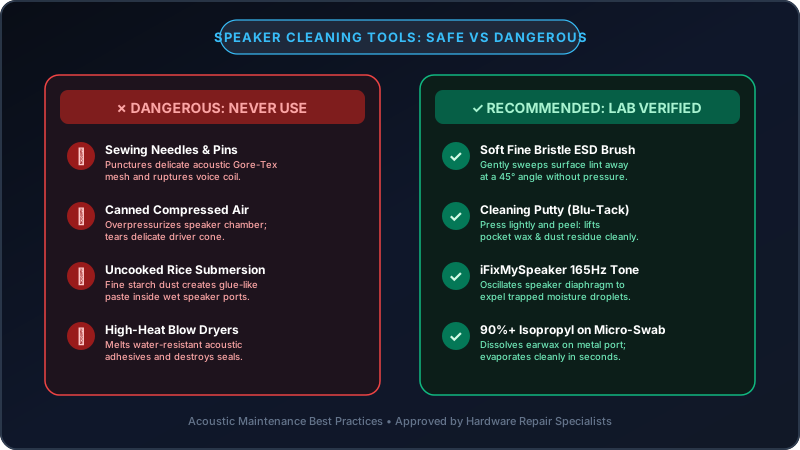
| Cleaning Tool | Safety Rating | Why / Mechanism |
|---|---|---|
| Fix My Speaker Sound Tool | 100% Safe (Recommended) | Uses acoustic air displacement to dislodge particles without physical contact. |
| Ultra-Soft Bristle Brush | Safe (Apple Approved) | Lifts lint without generating enough force to pierce the mesh membrane. |
| Adhesive Cleaning Putty | Safe when used gently | Grabs surface dust; lifts clean without residue if not jammed too hard. |
| 70% Isopropyl Alcohol (Damp Brush) | Safe with strict moderation | Breaks down earwax and grease; evaporates rapidly. |
| Canned Compressed Air | Highly Destructive (Prohibited) | Pressure >50 PSI tears the delicate waterproof mesh and damages diaphragm. |
| Sewing Needle / Safety Pin | Extreme Danger | Instant puncture of acoustic seal; creates costly hardware damage. |
| Water Submersion / Soapy Water | Destructive | Surfactants lower water tension, causing immediate ingress into internal electronics. |
Model Differences: iPhone 12/13/14 vs iPhone 15/16 Pro
Apple updated the acoustic chassis across recent generations:
- iPhone 12 & 13 Series: The top earpiece sits higher on the top glass rim. Lint tends to lodge directly into the seam between the front glass and aluminum frame.
- iPhone 14, 15, and 16 Pro: The Dynamic Island features an ultra-recessed earpiece speaker slit at the absolute top perimeter. The bottom ports on iPhone 15 and 16 surround a titanium-finished USB-C port, which requires extra care to prevent scratching the anodized bezel during brushing.
Verify Your Sound Quality
Once you have finished cleaning your iPhone grilles, open our Online Speaker Sound Test. Play the 440Hz Voice Clarity tone to ensure phone calls will sound loud and articulate, and run the Stereo Panning test to confirm balanced volume between your top ear speaker and bottom loudspeaker.